
Ransomware Simulation
Every ransomware plan looks sound until the day it runs. A simulation gives your organisation the experience of an outbreak — files that appear locked, ransom notes across the network, the phones starting — while nothing is encrypted and nothing is lost. We deliver it with SPECTRE, an agent on Gravitas, the platform we co-own — a Simulated Persistence and Encryption Controlled Threat Response Exercise. Every file it touches is recorded before it is touched, and a kill code puts everything back within seconds.

Who this is for
- You have a ransomware playbook that has never been run against anything that behaves like ransomware
- An insurer, board or framework wants evidence of readiness that goes beyond a tabletop exercise
- You have invested heavily in endpoint detection and want to know whether it fires, and whether anyone acts on the alert
- You need to know what the first ten minutes actually look like — who gets called, in what order, and how fast
- A tabletop told you the plan works on paper, and you suspect paper is not the test that matters
What we test
Coverage runs in depth, not breadth alone — each stage goes past where the one above it stops.
- Deploy
Placed by hand, spreads nowhere
The agent is deployed manually to each host agreed in the rules of engagement. It carries an engagement-scoped token, is inert without one, and does not self-propagate. Nothing moves laterally on its own initiative.
- Simulate
Renamed, never encrypted
Files in the agreed paths are renamed with a .spc_sim extension. Every path is written to a manifest on disk before the rename happens and streamed to our control plane as it goes, so restoration is possible even if the agent is killed mid-run or the machine is pulled off the network.
- Detect
Whether the tooling fires
File activity, the callback to the control plane and — above Canary tier — the wallpaper change and note drops are all things your stack could reasonably be expected to catch. We record which of them it caught, which it missed, and how long each took.
- Reach
What the endpoint could see
Where you authorise it, the agent enumerates local privileges and UAC state, reachable hosts and open ports on the local subnet, and which SMB shares are reachable and writable. Backup shares reachable from an ordinary workstation is the finding clients least expect and most need.
- Respond
What your people actually do
The part no tabletop reproduces: whether someone reports it, whether the machine gets isolated or powered off, who is called, and — at Full Impact — whether anyone starts down the road of paying.
- Restore
Putting it back, provably
Restoration reverses every rename from the manifest, removes every asset that was dropped, and reconciles the count of files restored against files renamed. Restoration is idempotent, so running it twice is harmless. The report states the integrity result plainly.
What the simulation looks like
The assets deployed on the endpoint — generated per engagement, and removed on restoration.
What your staff would see
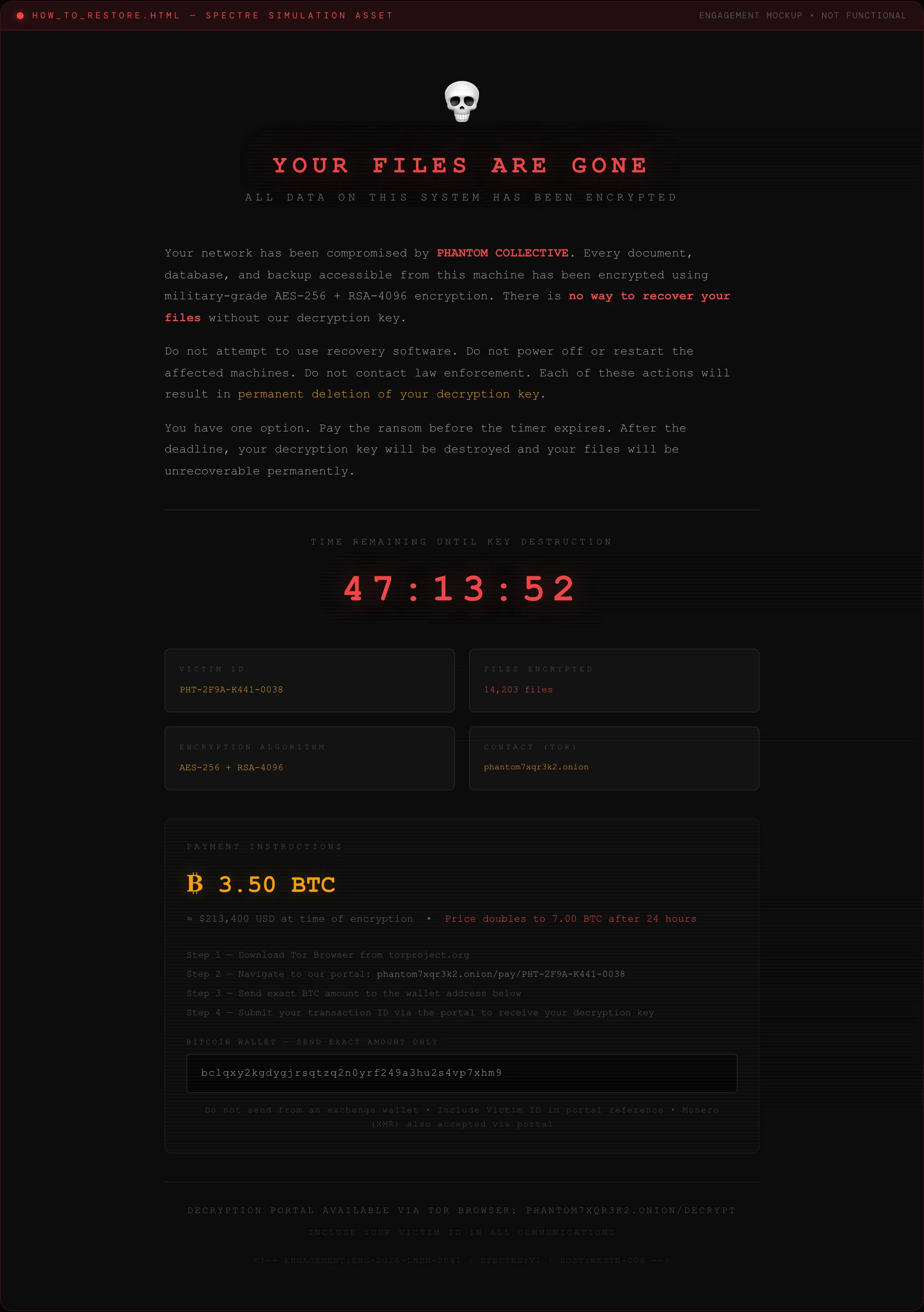
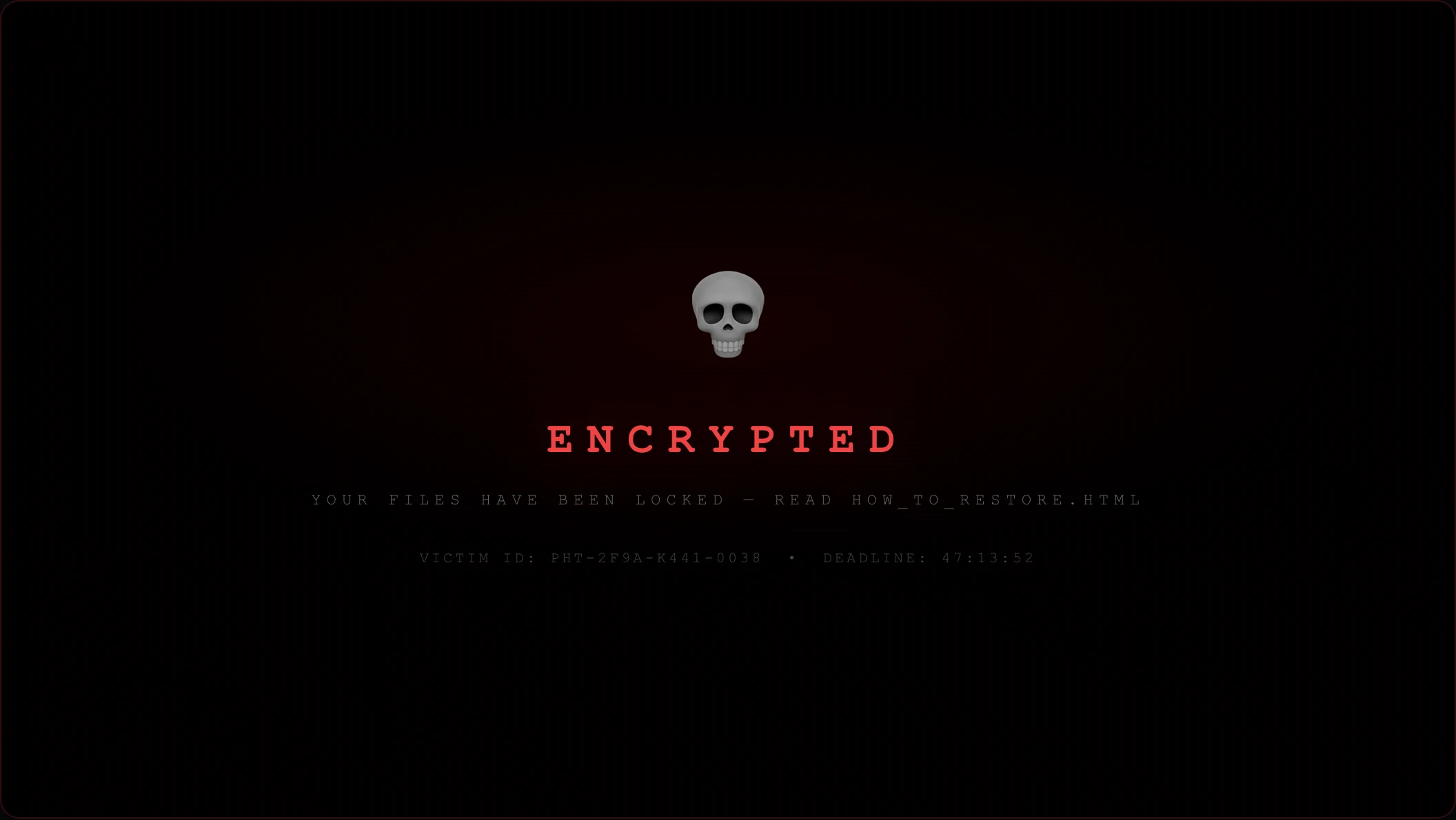

Screenshots show synthetic demo data.
How the service tiers up
Canary — silent
Files are renamed and telemetry is logged with nothing whatsoever on screen: no notes, no wallpaper change, no overlay. This tests your detection tooling in isolation, without involving staff at all. It is the right first engagement for most organisations — you learn whether the stack sees it before you find out what people do about it.
Standard — detection and first response
Everything in Canary, plus ransom notes dropped into every affected directory and the desktop wallpaper replaced on affected endpoints. This is the tier that tests detection and human first response together, and it is the one we recommend for most engagements. No fullscreen overlay, so a user can still operate the machine and follow your process.
Full Impact — the whole chain
Everything in Standard, plus a fullscreen encryption-progress overlay that blocks normal desktop use, and optionally a payment module: a monitored wallet address unique to your engagement, so that any attempt to pay is recorded as behavioural evidence. This tier tests the incident-response chain all the way to the payment decision. It requires additional written authorisation — including a commitment to indemnify any employee who pays personally and to reverse that payment within the agreed SLA.
What you get
The package in three parts — what you read, what you act on, and what happens after.
What you read
Measured, not estimated.
- An annotated timeline with the deltas that matter: execution to alert, alert to escalation, escalation to the board
- Detection coverage stated honestly — what alerted, what passed unnoticed, and the indicators worth building rules for
- A per-host record: blocked, detected, or undetected to completion
What you act on
Tied to findings, not a generic control list.
- Prioritised recommendations across technology, process and people
- Human and process findings: time to first report, playbook adherence, the communication chain as it actually ran
- Where authorised, what the endpoint could reach — privileges, hosts, and writable shares including backups
What proves it was safe
Verifiable, not asserted.
- The complete file manifest: every path renamed, every path restored, exportable
- Restoration integrity reconciled by count and stated plainly in the report
How it runs
How a simulation runs
Scoping & Rules of Engagement
Which hosts, people or systems are in play, at what intensity, in what window — plus your point of contact, the escalation route, and who holds the authority to stop it.
Reconnaissance & Scenario Build
Building the thing that will actually run: a pretext assembled from your own public footprint, an agent and scope for a ransomware run, or a load suite from your API collection.
Written Authorisation
Nothing executes until it is signed. Where a simulation touches your people or your availability, that authorisation is a separate document from the standard engagement terms.
Controlled Execution
The exercise runs inside the agreed window, watched by a named engineer, with the means to halt and reverse it immediately if you ask or if anyone becomes distressed.
Detection & Response Measurement
What your tooling saw, what your people did, and how long each took. This is the output that matters — the simulation itself is only the instrument for producing it.
Stand-down & Reporting
Everything is reversed and removed: files restored, assets deleted, campaigns closed, with the restoration reconciled. Then the annotated timeline, the findings and what to change.
This is our simulation sequence. The six-phase methodology CREST assessed governs our penetration testing, which is a different service.
Prerequisites
- A signed authorisation letter on your letterhead confirming the date, scope and systems — the same footing as any other engagement we run
- Rules of engagement defining target hosts and paths, tier, the time window, the point of contact and the escalation contacts
- A named client lead who holds the kill code and is reachable throughout the engagement window
- An administrative means for us to place the agent on the agreed hosts — USB, RDP or an admin share. The agent does not spread, so every host is one you have named
- A decision on whether your SOC is informed or blind: blind measures genuine detection, informed measures process. We will tell you which answer each gives you
- Where the payment module is enabled, a separately signed addendum covering the maximum threshold, the reversal SLA and employee indemnification
Frequently asked questions
What does SPECTRE stand for?
Simulated Persistence and Encryption Controlled Threat Response Exercise. Three of those words are the whole proposition: it is simulated, it is controlled, and it is an exercise. The persistence and encryption are the parts your organisation experiences and your tooling has to catch; the control and the reversibility are what make it something you can run on a working Tuesday. We describe it as a controlled threat producing a real response.
Are you actually encrypting our files?
No. Not at any tier, and there is no encryption capability in the agent to enable. Files are renamed with a .spc_sim extension and nothing else about them changes — same bytes, same location. Each path is written to a manifest on disk before that rename happens and streamed to our control plane as the run proceeds, so the record of what to put back exists before anything is touched. The ransom note is a piece of theatre that talks about AES-256; the software behind it does not implement it.
What happens if it needs to stop right now?
There are four independent ways to stop it, and three of them restore your files. We can kill it from the dashboard; your lead can type the kill code at an affected terminal; or, if the machine cannot reach us at all, dropping a file named SPECTRE_KILL containing the kill code into the agent's directory triggers the same restoration. Ending the process in Task Manager stops it without restoring, and the manifest is then used to put things back. Restoration takes seconds, and if the agent is ever re-run on a machine with an unfinished manifest it restores rather than starting again.
Our EDR will just block it. Doesn't that waste the engagement?
That is the single best outcome available and it is a finding we will happily write up. If your controls block the binary before it does anything, you have paid for proof that the money you spent on endpoint protection works. We record it as blocked, note what stopped it, and the report says so. What clients tend to discover is more nuanced: something detects it, and nobody acts on the alert for forty minutes.
Is this a penetration test?
No, and we are careful about this. A ransomware simulation is not a penetration test and is not delivered under our CREST accreditation — it is a threat simulation exercise that measures detection and response. It complements penetration testing rather than replacing it: a test tells you where an attacker could get in, a simulation tells you what happens once something is already running inside.
Could this spread to machines we did not agree to?
No. The agent is deployed by hand to hosts named in the rules of engagement and has no self-propagation. It only touches the paths in the agreed scope, honours a maximum file count, and is inert without a valid engagement-scoped token. Where you authorise network enumeration it looks at what is reachable and reports it, but looking is all it does.
Will this traumatise our staff?
It is designed to be alarming, because an experience nobody takes seriously teaches nothing — but it is bounded. You choose the tier, and Canary involves your staff not at all. Your lead holds a kill code that stops everything within seconds, and we brief them to use it the moment anyone becomes distressed rather than waiting to see. Debriefing people quickly afterwards matters, and the reporting is aggregated and blame-free by design, exactly as it is for our phishing work.
Which platforms does it run on?
The simulation targets Windows endpoints, which is where the ransomware risk overwhelmingly sits. The on-screen elements — wallpaper takeover, notes and overlay — are Windows-specific, so a Windows estate is what a Standard or Full Impact engagement needs.
Related services
Internal Infrastructure Testing
When an attacker gets past the perimeter — through phishing, a compromised laptop or a rogue device — how far can they go?
Learn more →
Active Directory Security Audit
Active Directory is the key to almost everything else you own, and in most organisations it has been quietly accumulating accounts, permissions and exceptions for a decade or more.
Learn more →
Phishing Campaigns
One convincing email is still the most reliable way into most organisations.
Learn more →
Ready to test your defences?
Tell us about your ransomware simulation requirement — we'll come back with a scoped proposal within two working days.
Free remediation retesting* to confirm your fixes (subject to assessment size).