

Internal Infrastructure Testing
When an attacker gets past the perimeter — through phishing, a compromised laptop or a rogue device — how far can they go? We take that assumed-breach position on your internal network and show you exactly what stands between an initial foothold and your most important systems.
Who this is for
- You have had an incident, or a near miss, and the board wants assurance about internal exposure
- An insurer, client or framework requires evidence of internal as well as external testing
- Your Active Directory has grown over years of mergers, migrations and quick fixes, and nobody is sure what state it is in
- You have tested the perimeter but never looked at what happens once someone is inside
What we test
Coverage runs in depth, not breadth alone — each stage goes past where the one above it stops.
- Foothold
What a device on your network already reaches
We start where a rogue device on your network starts — typically with no credentials at all — and see what can be reached, poisoned or relayed before anything is exploited. An assumed-breach start with a low-privilege account is an option, not a requirement.
- Segmentation
Whether the boundaries are real
User, server and management networks are checked for whether they are actually separated or only separated on the diagram. This is the control most often assumed rather than verified.
- Directory
Active Directory attack paths
Kerberoasting, AS-REP roasting, NTLM relay (including relay to LDAP and AD CS), delegation abuse and privilege-escalation chains — the routes that turn a user account into a domain account.
- Credentials
Password hygiene at scale
Weak, reused and breached credentials recovered during testing, cross-referenced against OSINT sources — because one reused password often shortens every path above.
- Crown jewels
Lateral movement to what matters
How a single compromised workstation becomes access to file servers, databases and the systems the business would actually miss. This is the part a vulnerability scan never reaches.
- Exfiltration
Getting the data out
Reaching the crown jewels is only half of it. We look at how data could actually leave the network and, where feasible and agreed, prove it by moving benign marker data past your egress controls — so DLP and filtering are measured, not assumed.
What the testing looks like
Our own tooling, built in-house — here is what it shows us.
The tooling
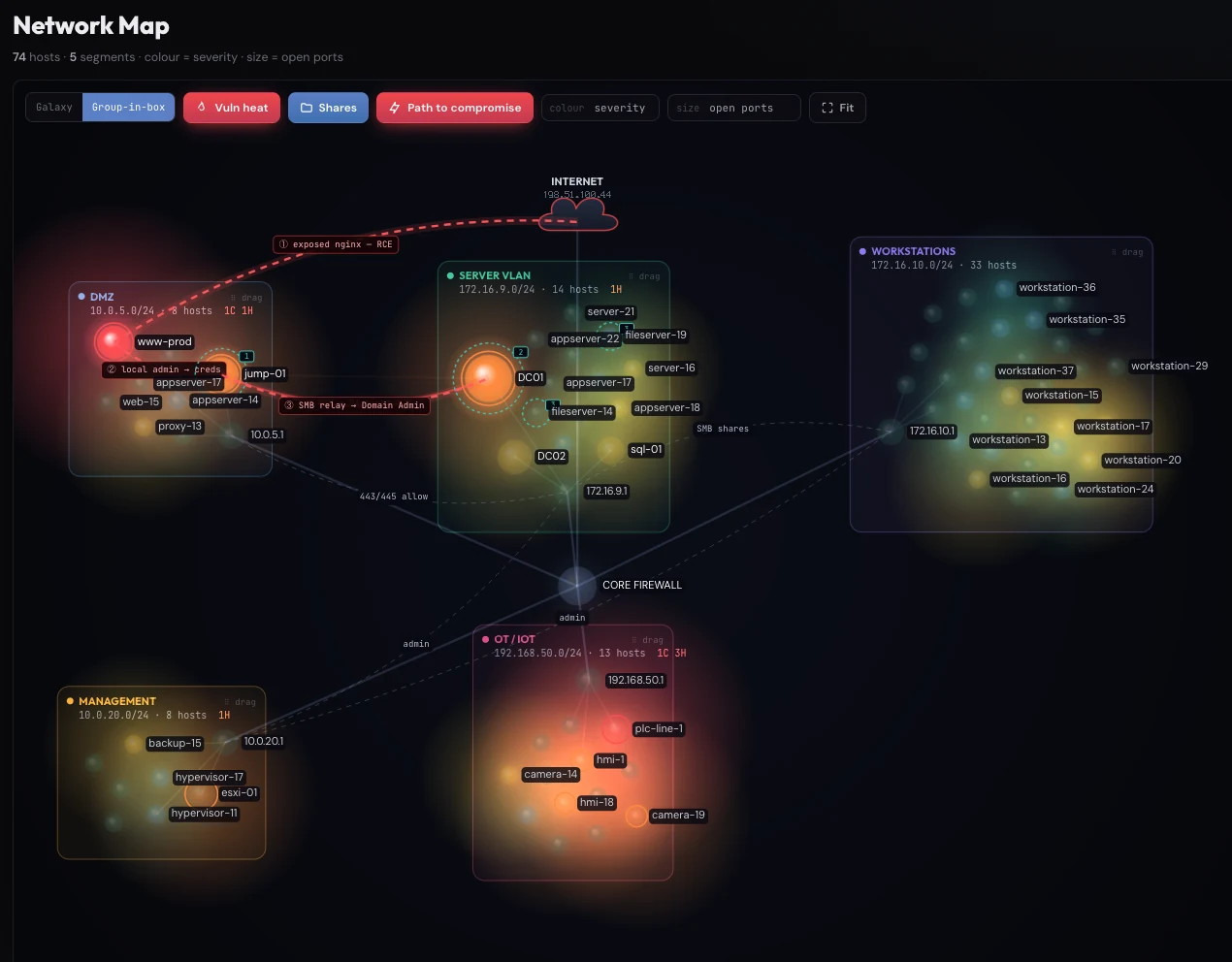
Screenshots show synthetic demo data.
What you get
The package in three parts — what you read, what you act on, and what happens after.
What you read
Written so leadership can follow the path, not just the finding count.
- A prioritised picture of your internal attack paths, from foothold to crown jewels
- CVSS-rated findings with the full technical chain we used, so your team can reproduce each step
What you act on
Hardening guidance, not just a list of missing patches.
- Practical guidance for Active Directory, segmentation and credential policy
- Immediate notification of any critical finding, during the engagement rather than in the report
What happens after
Closure is evidenced rather than assumed; retesting is scoped to the size of the environment.
- Remediation retesting to evidence the paths are closed*
* Free remediation retesting applies to penetration testing engagements. It is subject to the size of the assessment and available for three months from delivery of your report. A web application test is typically covered; a large engagement — an internal test across hundreds of systems, for example — is scoped and quoted, and a full re-assessment is always chargeable.
How it runs

The same six phases, every engagement
Threat Model Development
We agree what the exercise is replicating: the credible threats to your organisation, the starting position, the objectives, and which controls are in scope. It is also where disruption is bounded, so the test does not cost you a working day.
Information Gathering
Enumerating the systems and services actually in play from that starting point, so the attack surface is mapped as it is rather than as the asset register describes it — and choosing tools and techniques that suit it.
Vulnerability Identification
Examining that surface for weakness, using automated tooling for breadth and manual technique for everything a scanner cannot reason about. Neither finds what the other does, which is why the blend is deliberate.
Attack Vector Development
Weighing each weakness against your actual environment — how exploitable it really is, what skill it demands, what it would cost you. The output is the routes that are practical here, not the ones theoretically possible somewhere.
Exploitation
Where it is appropriate, we exploit, which usually opens a fresh attack surface and sends us back round the cycle. Where exploiting would cause harm we verify the finding is genuine rather than a stale banner, and assume the worst case.
Reporting
One document for two audiences: an executive summary your board can act on, and the technical chain your engineers can reproduce step by step, each finding carrying its severity and its remediation.
Prerequisites
- Network access from inside your environment — a device we ship and you plug in, VPN access, or a spare network port
- Credentials are optional: most tests start unauthenticated; provide a low-privilege account only if you want us to begin from an assumed-breach position
- A signed Laneden authorisation form
Frequently asked questions
Will you take down our network?
No. We avoid denial-of-service techniques entirely, agree fragile systems and exclusions at scoping, and coordinate anything potentially disruptive with your named contact before running it.
Why start from an assumed breach rather than trying to break in first?
Because initial access is a matter of time — phishing statistics and breach reports make that clear. Starting inside spends your budget on the question that matters: what damage is possible once someone is in.
We patch regularly. Do we still need this?
Patching helps, but most internal compromise we see comes from configuration: legacy protocols, over-privileged accounts and weak segmentation. None of those show up in patch reports.
Do you need credentials to test?
Usually none at all. Most internal tests start unauthenticated — a device on your network with no account — and we obtain our own foothold from there, then work towards Domain Admin. That journey is the finding. If you prefer, we can begin from an assumed-breach position with a low-privilege account instead — but we never need Domain Admin.
Related services
External Infrastructure Testing
Everything you expose to the internet — mail, VPN, remote access, forgotten subdomains — is being probed constantly by people who never asked permission.
Learn more →
Vulnerability Assessment
Not everything needs a full penetration test, and not every budget stretches to one each quarter.
Learn more →
Active Directory Security Audit
Active Directory is the key to almost everything else you own, and in most organisations it has been quietly accumulating accounts, permissions and exceptions for a decade or more.
Learn more →
Ready to test your defences?
Tell us about your internal infrastructure testing requirement — we'll come back with a scoped proposal within two working days.
Free remediation retesting* to confirm your fixes (subject to assessment size).